Home / Infrastructure / Memgraph HA cluster build log (historical)
Memgraph HA Cluster — Complete Build Log (historical)
Current state, checked 2026-10-23: none of the containers on this page exists in
incus list --all-projects. The live cluster is orchgraph: Memgraph HA cluster reference. Every container on the host is listed on Incus fleets.
DECOMMISSIONED 2026-07-10. This page documents the old Memgraph cluster — a 3-node Memgraph Community cluster (
memgraph-1/2/3) fronted by a custom Python HTTP HA controller (memgraph-ha), plus a standalonememgraph-db. That entire cluster was deleted on 2026-07-10 after its data was ported (with a verified parity check) to the current cluster, orchgraph. The container hostnames and IPs below no longer exist. It is retained only as a historical record of the design and rationale.For the live cluster, see Memgraph HA Cluster Reference (orchgraph). orchgraph is a custom C++ fork of Memgraph Community 3.11 with Raft-based HA (3 coordinators + 2 data instances); it has no HTTP controller — failover is coordinator-managed, and clients connect with a routing driver at
neo4j://10.53.1.160:7691.
This page describes how the (now-deleted) Memgraph cluster was built and why the decisions were made.
Why Memgraph
We needed a scalable, performant graph database for:
- RAG and GraphRAG over the knowledge wiki
- Semantic graph storage
- Codebase AST and dependency analysis
We evaluated Neo4j, TigerGraph, KùzuDB, and Memgraph. Memgraph was chosen because:
- Native Cypher support (Neo4j-driver compatible)
- Better single-node performance for our workloads
- Simpler operational model than causal clustering
- A fork of the open-source core is acceptable for our use case
What We Built
A 3-node Memgraph data cluster with a custom Python HA controller. (All containers/IPs below were deleted 2026-07-10 — historical.)
Historical topology (deleted 2026-07-10):
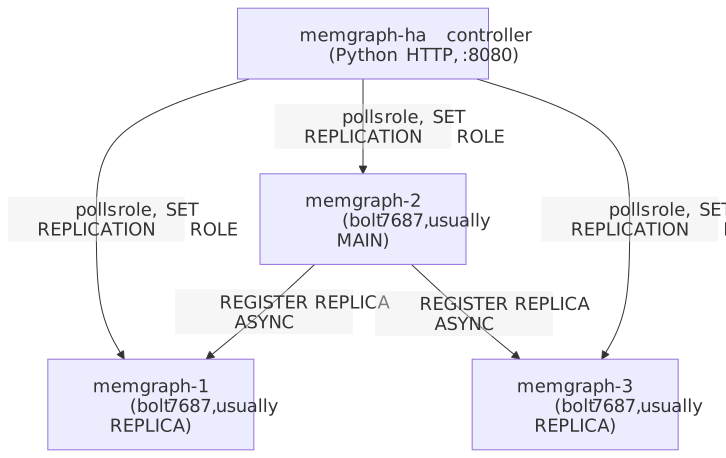
| Role | Container | Bolt URI | Notes |
|---|---|---|---|
| Data node 1 | memgraph-1 | bolt://<deleted>:7687 |
Usually replica |
| Data node 2 | memgraph-2 | bolt://<deleted>:7687 |
Usually MAIN |
| Data node 3 | memgraph-3 | bolt://<deleted>:7687 |
Usually replica |
| HA controller | memgraph-ha | http://<deleted>:8080 |
Routes writes to current MAIN |
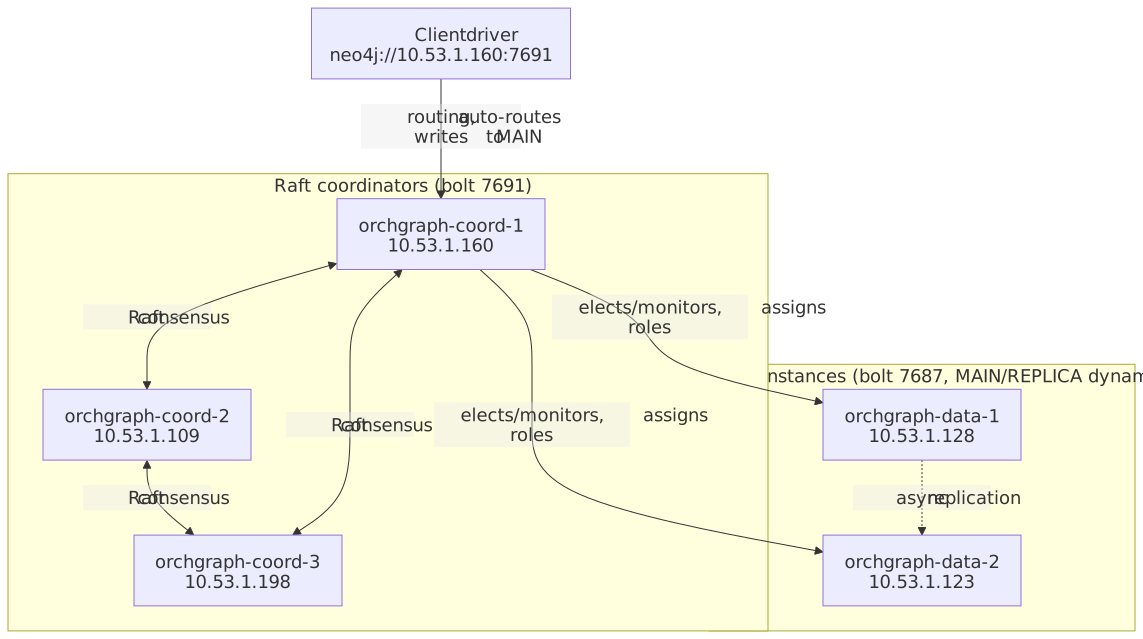
The current orchgraph layout that replaced this: 3 Raft coordinators (orchgraph-coord-1/2/3, bolt 7691) + 2 data instances (orchgraph-data-1/2, bolt 7687), client entry neo4j://10.53.1.160:7691. See the orchgraph reference.
Current live topology — orchgraph (Raft HA)
0. Prerequisites
- Incus installed and a project configured (default is fine).
- A Ubuntu Noble image available:
incus launch images:ubuntu/noble ... - Network access to
download.memgraph.com. - The orchestrata-ultimate source tree at
~/workspace/orchestrata-ultimate-architecture/.
1. Launch the Three Memgraph Data Nodes
Run the node launcher once per node. It is idempotent — if a container exists it is started instead of recreated.
cd ~/workspace/orchestrata-ultimate-architecture/incus

./memgraph-node-launch.sh memgraph-1
./memgraph-node-launch.sh memgraph-2
./memgraph-node-launch.sh memgraph-3
What happens inside each container
apt-get updateand install dependencies:
apt-get update -qq
apt-get install -y -qq wget curl ca-certificates libssl3 libcurl4 libicu74
- Download and install Memgraph 3.11.0:
cd /tmp
wget -q https://download.memgraph.com/memgraph/v3.11.0/ubuntu-24.04/memgraph_3.11.0-1_amd64.deb
dpkg -i memgraph_3.11.0-1_amd64.deb || apt-get install -y -f -qq
rm -f memgraph_3.11.0-1_amd64.deb
- Write
/etc/memgraph/memgraph.conf:
--data-directory=/var/lib/memgraph/mg_data
--bolt-address=0.0.0.0
--bolt-port=7687
--monitoring-address=0.0.0.0
--monitoring-port=7444
--metrics-address=0.0.0.0
--metrics-port=9091
--log-level=INFO
--storage-properties-on-edges=true
--query-modules-directory=/usr/lib/memgraph/query_modules
- Create a systemd override so Memgraph loads its bundled
libstdc++:
mkdir -p /etc/systemd/system/memgraph.service.d
cat > /etc/systemd/system/memgraph.service.d/ld-library-path.conf <<EOF
[Service]
Environment=LD_LIBRARY_PATH=/usr/lib/memgraph
EOF
- Enable and start the service:
systemctl daemon-reload
systemctl restart memgraph
systemctl enable memgraph
- Wait for port
7687to listen.
At this point each node is a standalone Memgraph instance. They are not yet clustered.
2. Launch the HA Controller
The controller turns three standalone instances into a replication cluster.
./memgraph-cluster-launch.sh
What the script does
- Calls
memgraph-node-launch.shformemgraph-1,memgraph-2,memgraph-3. - Collects each container's Incus IP.
- Builds
MEMGRAPH_HA_NODES:
memgraph-1|bolt://<node1-ip>:7687|<node1-ip>,memgraph-2|bolt://<node2-ip>:7687|<node2-ip>,memgraph-3|bolt://<node3-ip>:7687|<node3-ip>
- Creates the
memgraph-hacontroller container fromimages:ubuntu/noble. - Installs Python,
pip,venv,sqlite3. - Creates
/opt/memgraph-ha/venv. - Installs
uv, then uses it to install:
fastapi uvicorn[standard] neo4j anyio httpx
- Copies controller source into the container:
/opt/memgraph-ha/src/orchestrata_ultimate/__init__.py
/opt/memgraph-ha/src/orchestrata_ultimate/semantic_graph/
- Writes
/etc/systemd/system/memgraph-ha.service:
[Unit]
Description=Memgraph HA Controller
After=network.target

[Service]
Type=simple
User=root
WorkingDirectory=/opt/memgraph-ha
Environment=MEMGRAPH_HA_NODES=memgraph-1|bolt://<node1-ip>:7687|<node1-ip>,...
Environment=MEMGRAPH_HA_PORT=8080
Environment=MEMGRAPH_HA_HOST=0.0.0.0
Environment=MEMGRAPH_HA_DB_PATH=/var/lib/memgraph-ha/state.db
Environment=MEMGRAPH_HA_REPLICATION_MODE=ASYNC
Environment=MEMGRAPH_HA_POLL_INTERVAL=2.0
Environment=PYTHONPATH=/opt/memgraph-ha/src
ExecStart=/opt/memgraph-ha/venv/bin/python -m orchestrata_ultimate.semantic_graph.ha_controller_cli
Restart=on-failure
RestartSec=5

[Install]
WantedBy=multi-user.target
- Reloads systemd, enables and starts the service.
- Waits for port
8080.
3. How the Controller Bootstraps the Cluster
On first start:
- Parses
MEMGRAPH_HA_NODESintoNodeConfigobjects. - Opens SQLite at
MEMGRAPH_HA_DB_PATH. - Creates the
cluster_statetable if it does not exist. - Loads persisted
current_mainandepochfrom SQLite. - If no state exists, bootstraps with the first node in the list as MAIN.
- Saves state to SQLite.
4. How Replication Is Established
During each poll cycle:
- The controller queries every node for its current role.
- If the persisted MAIN is healthy, it ensures that node is MAIN and the others are registered as REPLICAs.
- If a node is down, it is marked unhealthy.
- If the MAIN is down, a failover is triggered.
Cypher run on the MAIN:
SET REPLICATION ROLE TO MAIN;
REGISTER REPLICA `memgraph-1` ASYNC TO "<node1-ip>:10000";
REGISTER REPLICA `memgraph-3` ASYNC TO "<node3-ip>:10000";
Cypher run on each replica:
SET REPLICATION ROLE TO REPLICA WITH PORT 10000;
5. Autofailover Sequence
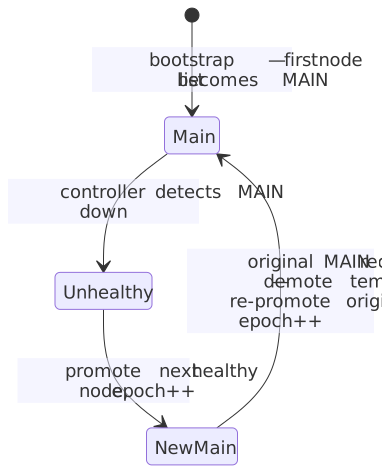
When the current MAIN stops responding:
- Controller marks it unhealthy.
- Picks the next healthy node from the node list.
- Runs
SET REPLICATION ROLE TO MAINon the promoted node. - Registers remaining healthy nodes as REPLICAs against the new MAIN.
- Increments
epoch. - Saves new state to SQLite.
/mainnow returns the new MAIN URI.
6. Autofailback Sequence
When the original MAIN recovers:
- Controller detects it is healthy.
- Demotes the temporary MAIN back to REPLICA.
- Re-promotes the original preferred node to MAIN.
- Re-registers all nodes against the recovered MAIN.
- Increments
epoch. - Saves state.
This was the primary requirement — the reason we built custom HA instead of using Enterprise.
MAIN-role lifecycle across a failover/failback cycle:
7. Verify the Cluster
curl http://<memgraph-ha-ip>:8080/main
curl http://<memgraph-ha-ip>:8080/status
From inside a data node:
incus exec memgraph-2 -- mgconsole -u "" -p "" --host <node2-ip> --port 7687
SHOW REPLICAS;
8. Configure Clients
Set in ~/workspace/knowledge-wiki/.env:
MEMGRAPH_HA_CONTROLLER_URL=http://<memgraph-ha-ip>:8080
MEMGRAPH_USERNAME=
MEMGRAPH_PASSWORD=
The repository client calls /main and connects to the returned Bolt URI.
9. Day-2 Operations
Restart a replica:
incus restart memgraph-1
# Controller re-detects and re-registers it automatically.
Force failover:
curl -X POST http://<memgraph-ha-ip>:8080/failover
Force failback:
curl -X POST 'http://<memgraph-ha-ip>:8080/failback?preferred=bolt://<node1-ip>:7687'
Deploy fresh cluster:
cd ~/workspace/orchestrata-ultimate-architecture/incus
./memgraph-cluster-launch.sh
10. Client Integration
Repository client: ~/workspace/knowledge-wiki/graph-indexer/memgraph_client.py
It:
- Discovers MAIN via the HA controller
/mainendpoint - Connects with the Neo4j driver
- Provides typed upserts for
Page,Project,Concept,Agent,Service,Procedure,Decision,Blocker,Session,Tag - Manages relationships and vector indexes
Usage example:
from graph_indexer.memgraph_client import get_connection

client = get_connection()
client.upsert_project(slug="orchestrata-ultimate", title="Orchestrata Ultimate")
client.upsert_service(name="memgraph-cluster", description="HA Memgraph cluster")
client.close()
11. RAG / GraphRAG Integration
The knowledge wiki uses Memgraph for the structured graph and a local sentence-transformers vector store for semantic search. The RAG query pipeline can expand results via graph traversal:
wiki-rag-query "Explain the repository pattern" --graph-expand --graph-depth 1 --graph-limit 10
This finds the top vector matches, then traverses LINKS_TO/MENTIONS relationships in Memgraph to add related pages to the context.
12. Replication Details
- Default mode:
ASYNC. - One MAIN, two REPLICAs.
- Controller registers replicas and re-registers them after restarts.
- Failover and failback are driven by the Python HA controller container.
13. Vector Search
The current Memgraph build has the vector_search module available. We keep the local sentence-transformers store as the primary vector index to avoid an Enterprise dependency, but we also create a native vector index on Chunk(embedding) for future use.
14. Known Limitations
- The HA controller is a single container. If it dies, the cluster continues to run but automatic failover stops until the controller restarts.
- A future iteration is a 3-node Raft controller cluster.
- Split-brain protection relies on the controller's single view.